 Skip to content

Understanding IPTV M3U Playlists
What is IPTV and How Does it Work?
IPTV, or Internet Protocol Television, is a revolutionary way to stream television content over the internet rather than through traditional satellite or cable formats. This technology allows users to access a vast array of channels and on-demand content, making it a popular choice for viewers seeking flexibility and variety. With IPTV, you can enjoy live TV, movies, and series from around the globe, all from the comfort of your PC.
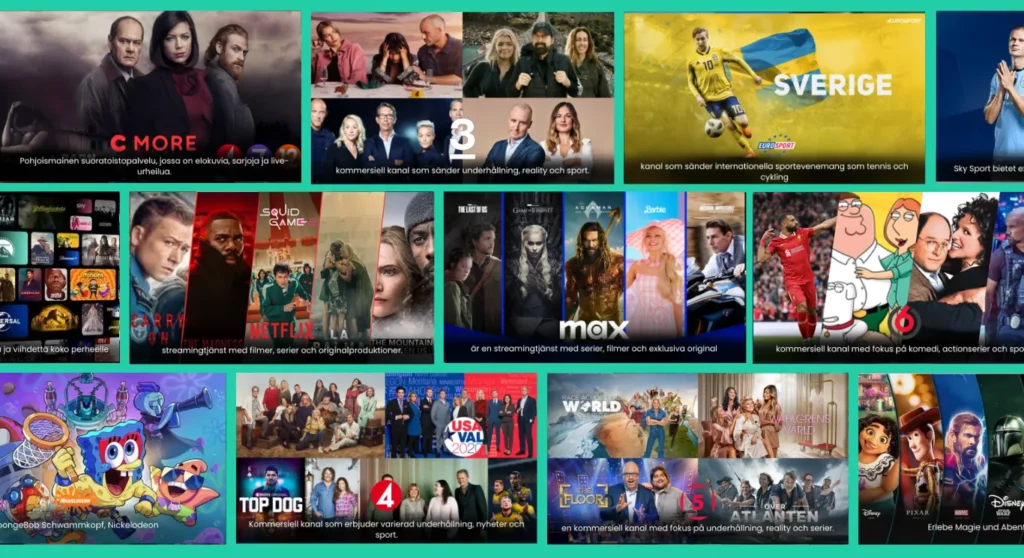
The core of IPTV lies in its ability to deliver content via M3U playlists. An M3U file is a plain text file that contains a list of media files, including URLs to streaming content. When you use an IPTV M3U player PC, it reads these playlists and allows you to watch the channels or content specified in the file. This means that with the right IPTV player, you can access thousands of channels, including local Swedish channels, international networks, and even premium content.
The Role of M3U Playlists in IPTV Streaming
M3U playlists are essential for anyone looking to utilize IPTV services effectively. They serve as a bridge between the user and the content, providing a structured way to access various channels and shows. Here are some key points about M3U playlists:
- Format: M3U files are simple text files that can be created or edited using any text editor. They typically contain links to streaming media, which can be live TV channels or video-on-demand content.
- Flexibility: Users can customize their M3U playlists by adding or removing channels according to their preferences. This flexibility allows for a personalized viewing experience.
- Compatibility: Most IPTV players, including popular options like IPTV Extreme for Windows, support M3U playlists, making it easy to load and manage your favorite channels.
For those interested in exploring IPTV options, Smart IPTV Nordic offers a comprehensive service with over 30,000 channels and unlimited VOD content. You can learn more about their offerings and plans here.
In summary, understanding IPTV and M3U playlists is crucial for anyone looking to enhance their viewing experience on a PC. With the right IPTV M3U player, you can unlock a world of entertainment tailored to your preferences. If you’re ready to dive into the world of IPTV, consider starting your free trial with Smart IPTV Nordic today—no credit card required! For more information, feel free to reach out via WhatsApp.
Choosing the Best IPTV M3U Player for PC
When it comes to enjoying IPTV on your PC, selecting the right IPTV M3U player is crucial. With a plethora of options available, it’s essential to understand what features to look for and which players stand out in the market. This section will guide you through the key features to consider and highlight some of the top free and paid IPTV M3U players for Windows.
Key Features to Look for in an IPTV Player
Choosing the best IPTV M3U player for your PC involves evaluating several important features. Here are the key aspects to consider:
- Compatibility: Ensure that the player supports M3U playlists and is compatible with your operating system, whether it’s Windows or macOS.
- User Interface: A user-friendly interface enhances the viewing experience. Look for players that are easy to navigate and allow quick access to channels.
- Streaming Quality: Opt for players that support high-definition streaming, including 4K and UHD options, to enjoy crystal-clear visuals.
- Stability and Performance: The player should provide a stable streaming experience with minimal buffering. Fast loading times are essential for uninterrupted viewing.
- Customization Options: The ability to customize your channel list and manage playlists can significantly enhance your experience. Look for players that allow easy editing of M3U files.
- Support for VOD: If you enjoy video-on-demand content, ensure that the player supports this feature, allowing you to access movies and series seamlessly.
Top Free and Paid IPTV M3U Players for Windows
Now that you know what to look for, let’s explore some of the best IPTV M3U players available for Windows. Here’s a comparison of both free and paid options:
| Player Name | Type | Key Features | Price |
|---|---|---|---|
| VLC Media Player | Free | Supports M3U, customizable playlists, cross-platform | Free |
| IPTV Extreme | Free | User-friendly interface, supports EPG, VOD | Free |
| Perfect Player | Free | Advanced settings, EPG support, customizable UI | Free |
| IPTV Smarters Pro | Paid | Multi-screen support, VOD, parental controls | €15/month |
| Kodi | Free | Highly customizable, supports various add-ons | Free |
| GSE Smart IPTV | Paid | User-friendly, supports multiple formats | €10 one-time |
VLC Media Player is a popular choice due to its versatility and support for various formats, making it an excellent option for those looking for a free IPTV M3U player. On the other hand, IPTV Smarters Pro offers advanced features for a subscription fee, making it suitable for users who want a more robust experience.
For those interested in IPTV for Windows, these players provide a range of functionalities that cater to different viewing preferences. Whether you prefer a free option or are willing to invest in a paid player, there’s something for everyone.
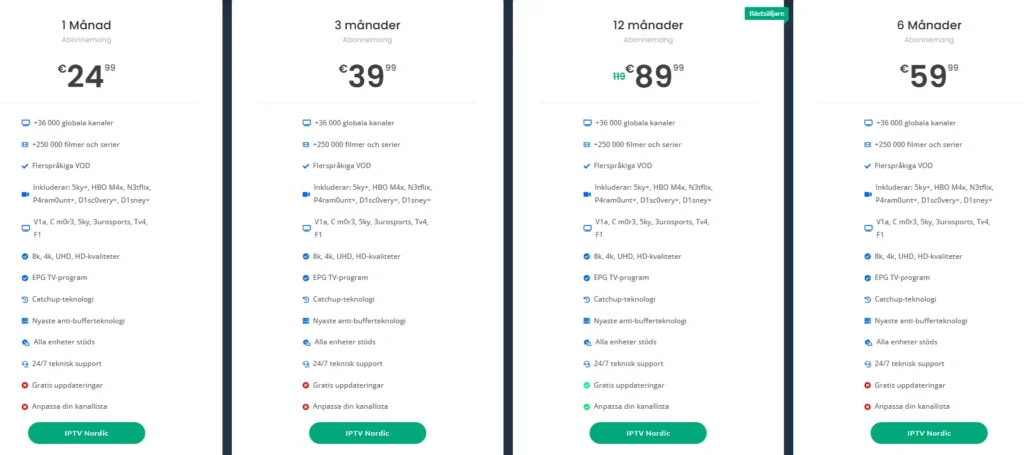
If you’re ready to enhance your IPTV experience, consider trying out Smart IPTV Nordic, which offers a vast selection of channels and VOD content. You can explore their plans here and start your free trial today—no credit card required!
In conclusion, selecting the right IPTV M3U player for your PC is essential for a satisfying viewing experience. By considering the key features and exploring the top players available, you can find the perfect match for your needs. For more information on IPTV services and playlists, feel free to visit Smart IPTV Nordic or reach out via WhatsApp.
Installation and Setup Guide for IPTV M3U Players
Setting up an IPTV M3U player on your PC is a straightforward process that can open up a world of entertainment. Whether you are using Windows or macOS, this guide will walk you through the steps to download, install, and configure your IPTV player effectively. By following these instructions, you can enjoy seamless streaming of your favorite channels and content.
How to Download IPTV Players on Windows and macOS
The first step in enjoying IPTV on your PC is to download a suitable IPTV M3U player. Here’s how to do it for both Windows and macOS:
- Choose Your Player: Select an IPTV player that meets your needs. Popular options include VLC Media Player, IPTV Extreme, and Perfect Player. Each of these players supports M3U playlists and offers unique features.
- Download the Player:
- For Windows: Visit the official website of the chosen player. For example, you can download VLC from VLC’s official site. Click on the download link and follow the prompts to install the software.
- For macOS: Similarly, go to the player’s website and download the macOS version. Follow the installation instructions provided.
- Install the Player: Once the download is complete, open the installer and follow the on-screen instructions to install the player on your PC.
Step-by-Step Instructions for Setting Up Your IPTV Player
After successfully installing your IPTV player, the next step is to set it up for streaming. Here’s a detailed guide on how to configure your IPTV M3U player:
- Open the IPTV Player: Launch the player you just installed.
- Load Your M3U Playlist:
- In VLC Media Player:
- Go to
Media>Open Network Stream. - Paste the M3U URL or select the M3U file from your computer.
- Click
Playto start streaming.
- Go to
- In IPTV Extreme:
- Navigate to the
Settingsmenu. - Select
Add Playlistand enter the M3U URL or upload the file. - Save the settings and return to the main menu to access your channels.
- Navigate to the
- Configure Additional Settings: Depending on the player, you may have options to customize your viewing experience. This can include adjusting video quality, enabling subtitles, or setting up an Electronic Program Guide (EPG) for easier navigation.
- Test Your Setup: Once you have loaded your M3U playlist, browse through the channels to ensure everything is working correctly. If you encounter any issues, refer to the troubleshooting section below.
- Enjoy Streaming: With your IPTV M3U player set up, you can now enjoy a wide range of channels and on-demand content. For a comprehensive IPTV experience, consider subscribing to services like Smart IPTV Nordic, which offers over 30,000 channels and unlimited VOD content. You can explore their plans here.
Troubleshooting Common Setup Issues
While setting up your IPTV M3U player is generally straightforward, you may encounter some common issues. Here are a few troubleshooting tips:
- Buffering Issues: If your stream is buffering frequently, check your internet connection speed. A stable connection of at least 10 Mbps is recommended for smooth streaming.
- M3U Playlist Not Loading: Ensure that the M3U URL is correct and that the playlist is still active. You can test the URL in a web browser to verify its functionality.
- Player Crashes or Freezes: If your player crashes, try reinstalling it or updating to the latest version. Additionally, ensure your PC meets the system requirements for the player.
By following these steps, you can successfully install and set up your IPTV M3U player on your PC, allowing you to enjoy a vast array of channels and content. For more information on IPTV services and playlists, feel free to visit Smart IPTV Nordic or reach out via WhatsApp.
In conclusion, setting up an IPTV M3U player is a simple yet rewarding process that enhances your viewing experience. With the right player and a well-configured setup, you can access a world of entertainment tailored to your preferences. Start your free trial with Smart IPTV Nordic today—no credit card required!
Using IPTV M3U Players Effectively
Once you have selected and installed your IPTV M3U player on your PC, the next step is to use it effectively to maximize your viewing experience. This section will guide you through adding channels, managing your M3U playlists, and optimizing playback settings for a seamless streaming experience.
Adding Channels and Managing Your M3U Playlists
One of the primary advantages of using an IPTV M3U player is the ability to customize your viewing experience by adding channels and managing playlists. Here’s how to do it:
- Loading Your M3U Playlist:
- Open your IPTV player (e.g., VLC Media Player, IPTV Extreme).
- Navigate to the option for adding playlists. In VLC, go to
Media>Open Network Stream, and paste your M3U URL. In IPTV Extreme, go toSettingsand selectAdd Playlist. - If you have a local M3U file, you can upload it directly from your computer.
- Editing Your Playlist:
- You can edit your M3U playlist using a text editor. This allows you to add or remove channels as per your preference. Simply open the M3U file in a text editor and modify the URLs as needed.
- For example, if you want to remove a channel, locate its URL in the M3U file and delete that line.
- Organizing Channels:
- Many IPTV players allow you to organize channels into categories or favorites. This feature can help you quickly access your preferred channels without scrolling through a long list.
- In IPTV Extreme, you can create groups for different types of content, such as sports, movies, or news.
- Updating Your Playlist:
- M3U playlists can become outdated as channels change or are removed. Regularly check for updated M3U links from your IPTV provider or community forums to ensure you have access to the latest content.
Optimizing Playback Settings for a Better Experience
To enhance your streaming experience, it’s essential to optimize the playback settings of your IPTV M3U player. Here are some tips to consider:
- Adjusting Video Quality:
- Depending on your internet speed, you may want to adjust the video quality settings. Most IPTV players allow you to select the resolution, such as HD, FHD, or 4K. For optimal performance, choose a resolution that matches your internet bandwidth.
- A stable connection of at least 10 Mbps is recommended for HD streaming, while 25 Mbps or higher is ideal for 4K content.
- Enabling Subtitles:
- If you enjoy watching international content, enabling subtitles can enhance your viewing experience. Most IPTV players support subtitle files, which can be loaded alongside your M3U playlist.
- In VLC, you can enable subtitles by going to
Subtitle>Add Subtitle Fileand selecting the appropriate file.
- Using an Electronic Program Guide (EPG):
- An EPG provides a schedule of upcoming shows and channels, making it easier to navigate your IPTV content. Many IPTV players support EPG integration, allowing you to view program information directly within the player.
- To set up EPG in IPTV Extreme, go to
Settings>EPGand enter the URL for the EPG source.
- Troubleshooting Playback Issues:
- If you experience buffering or freezing, consider lowering the video quality or checking your internet connection. Additionally, ensure that your M3U playlist is functioning correctly by testing the URLs in a web browser.
By effectively adding channels and managing your M3U playlists, along with optimizing playback settings, you can significantly enhance your IPTV viewing experience. For those looking for a reliable IPTV service, Smart IPTV Nordic offers over 30,000 channels and unlimited VOD content, ensuring a diverse selection for every viewer. Explore their plans here and start your free trial today—no credit card required!
In conclusion, utilizing your IPTV M3U player effectively involves not just loading channels but also managing and optimizing your settings for the best possible experience. With the right approach, you can enjoy a tailored viewing experience that meets your preferences and needs. For more information on IPTV services and playlists, feel free to visit Smart IPTV Nordic or reach out via WhatsApp.
Troubleshooting Common IPTV M3U Player Issues
Even with the best IPTV M3U players on your PC, you may encounter some common issues that can disrupt your viewing experience. Understanding how to troubleshoot these problems can save you time and frustration, allowing you to get back to enjoying your favorite content. In this section, we will explore common playback issues, their causes, and effective solutions to ensure a smooth streaming experience.
Fixing Buffering and Playback Problems
Buffering and playback issues are among the most common problems faced by IPTV users. Here are some potential causes and solutions:
- Internet Connection Speed:
- Cause: A slow or unstable internet connection can lead to buffering.
- Solution: Test your internet speed using online speed tests. For optimal streaming, a minimum speed of 10 Mbps is recommended for HD content, while 25 Mbps or higher is ideal for 4K streaming. If your speed is lower, consider upgrading your internet plan or connecting via Ethernet instead of Wi-Fi for a more stable connection.
- Server Overload:
- Cause: If too many users are accessing the same IPTV server, it can lead to buffering.
- Solution: Try switching to a different channel or content. If the issue persists, it may be worth checking with your IPTV provider for server status updates or alternative server options.
- Player Settings:
- Cause: Incorrect settings in your IPTV player can affect playback quality.
- Solution: Adjust the video quality settings in your player. Lowering the resolution can help reduce buffering. In VLC Media Player, you can do this by going to
Tools>Preferences>Input/Codecsand adjusting theFile caching (ms)value.
- M3U Playlist Issues:
- Cause: An outdated or broken M3U playlist can lead to playback problems.
- Solution: Regularly update your M3U playlist by checking for new links from your IPTV provider. You can also test the M3U URL in a web browser to ensure it is still active.
Solutions for Common Setup Issues
Setting up your IPTV M3U player can sometimes lead to challenges. Here are some common setup issues and how to resolve them:
- M3U Playlist Not Loading:
- Cause: Incorrect URL or file path.
- Solution: Double-check the M3U URL for typos or errors. If you are using a local file, ensure that the file path is correct and that the file is accessible.
- Player Crashes or Freezes:
- Cause: Incompatibility or software bugs.
- Solution: Ensure that your IPTV player is updated to the latest version. If the problem persists, consider reinstalling the player or trying a different one. For example, if you are using IPTV Extreme, you might want to switch to VLC Media Player or Perfect Player to see if the issue resolves.
- No Sound or Audio Issues:
- Cause: Audio settings may be misconfigured.
- Solution: Check the audio settings in your player. In VLC, go to
Audio>Audio Deviceand ensure the correct output device is selected. Additionally, verify that your system volume is turned up and not muted.
- EPG Not Displaying:
- Cause: EPG URL may be incorrect or not supported.
- Solution: Verify the EPG URL provided by your IPTV service. Ensure that it is correctly entered in your player’s settings. If the EPG still does not display, check with your provider for compatibility.
Legal and Privacy Considerations in Sweden
As the popularity of IPTV M3U players continues to rise, it is essential for users in Sweden to understand the legal landscape surrounding IPTV streaming and the privacy implications involved. This section will provide insights into the legal status of IPTV in Sweden, along with practical tips for protecting your privacy while enjoying your favorite content.
Understanding the Legal Status of IPTV in Sweden
In Sweden, the legal framework governing IPTV services is primarily influenced by copyright laws and broadcasting regulations. Here are some key points to consider:
- Copyright Compliance: Streaming content through IPTV services must comply with copyright laws. Unauthorized distribution of copyrighted material is illegal, and users should ensure that the IPTV service they choose has the necessary licenses to broadcast the channels and content offered.
- Legitimate IPTV Providers: It is advisable to use reputable IPTV providers that operate within the legal framework. Services like Smart IPTV Nordic offer a wide range of channels and VOD content while adhering to copyright regulations. They provide access to over 30,000 channels, ensuring that users can enjoy content legally and safely.
- User Responsibility: As a user, it is your responsibility to verify the legality of the IPTV service you are using. Engaging with illegal IPTV services can lead to legal repercussions, including fines or other penalties.
- Regulatory Bodies: The Swedish Broadcasting Authority (Myndigheten för press, radio och tv) oversees broadcasting regulations in Sweden. They ensure that all broadcasting services comply with national laws, including those related to IPTV.
Tips for Protecting Your Privacy While Streaming
While enjoying IPTV services, it is crucial to prioritize your privacy and security. Here are some effective tips to help you protect your personal information while streaming:
- Use a VPN: A Virtual Private Network (VPN) encrypts your internet connection, making it more difficult for third parties to track your online activities. This is particularly important when using IPTV services, as it helps safeguard your privacy and allows you to access geo-restricted content.
- Choose Secure IPTV Players: Opt for IPTV players that prioritize user security and privacy. Look for players that do not store your personal data or viewing history. IPTV Extreme for Windows is a popular choice that offers a user-friendly interface while maintaining a focus on privacy.
- Avoid Free IPTV Services: While free IPTV services may seem appealing, they often come with risks, including malware and data breaches. Paid services like Smart IPTV Nordic provide a more secure and reliable streaming experience, ensuring that your data is protected.
- Regularly Update Your Software: Keeping your IPTV player and any associated software up to date is essential for maintaining security. Updates often include patches for vulnerabilities that could be exploited by malicious actors.
- Be Cautious with Personal Information: When signing up for IPTV services, be mindful of the personal information you share. Only provide the necessary details and avoid sharing sensitive information unless absolutely required.
- Read Privacy Policies: Before subscribing to any IPTV service, take the time to read their privacy policy. This document outlines how your data will be used and protected, helping you make informed decisions about your streaming options.
Conclusion: Unlock Your IPTV Experience with the Best IPTV M3U Player for PC
In conclusion, choosing the right IPTV M3U player for PC can significantly enhance your streaming experience, providing you with access to a vast array of channels and on-demand content. With features like 24/7 support, comprehensive setup guides, and a constantly updated library of IPTV content, you can enjoy seamless viewing tailored to your preferences.
Here are some key benefits of using an IPTV M3U player:
- Wide Selection: Access over 30,000 global channels and unlimited VOD content with services like Smart IPTV Nordic.
- User-Friendly Setup: Follow easy installation guides to get your IPTV player up and running in no time.
- Reliable Support: Enjoy peace of mind with 24/7 customer support to assist you with any questions or issues.
If you’re ready to elevate your IPTV experience, we invite you to explore our pricing plans and start your free trial today—no credit card required! For any questions or assistance, feel free to reach out via WhatsApp.
Don’t miss out on the opportunity to enjoy your favorite shows and channels with the best IPTV M3U player for PC. Start your journey with Smart IPTV Nordic today!
