 Skip to content
Understanding Your IPTV Box and Its Features
What is an IPTV Box and how to activate iptv box?
An IPTV box is a device that allows you to stream television content over the internet rather than through traditional cable or satellite services. This technology utilizes your internet connection to deliver a wide array of channels and on-demand content directly to your TV. In Sweden, IPTV has gained popularity due to its flexibility and the vast selection of channels available.

The way IPTV works is quite straightforward. When you subscribe to an IPTV service, you receive an IPTV activation code that unlocks access to a specific set of channels and content. This code is essential for activating your IPTV box, ensuring that you can enjoy your favorite shows and movies without interruption.
Benefits of Using IPTV Boxes
Using an IPTV box comes with numerous advantages, particularly for users in Sweden. Here are some key benefits:
- Access to Over 36,000 International Channels: With an IPTV box, you can enjoy a diverse range of channels from around the world, catering to various tastes and preferences.
- Availability of 250,000 VOD Movies and Series: IPTV services often include a vast library of video-on-demand content, allowing you to watch movies and series at your convenience.
- High-Quality Streaming Options: Many IPTV boxes support streaming in 4K, 8K, UHD, and HD quality, ensuring a superior viewing experience. This is particularly important for users who value picture clarity and detail.
In addition to these benefits, IPTV boxes are compatible with various devices, making them a versatile choice for entertainment. For more information on the features and subscription plans available, visit Smart IPTV Nordic.
Step-by-Step Activation Process
Activating your IPTV box is a straightforward process that allows you to enjoy a wide range of channels and on-demand content. In this section, we will guide you through the essential steps on how to activate your IPTV box effectively, ensuring you have a seamless experience.
Connecting the IPTV Box to Your TV and Internet
The first step in the activation process is to connect your IPTV box to both your television and the internet. Here’s how to do it:
- Required Cables: Ensure you have the necessary cables, including an HDMI cable to connect your IPTV box to your TV and an Ethernet cable for a wired internet connection. If you prefer a wireless setup, ensure your IPTV box supports Wi-Fi.
- Connecting to TV: Plug one end of the HDMI cable into the IPTV box and the other end into an available HDMI port on your TV.
- Connecting to the Internet:
- For a wired connection, connect the Ethernet cable from your router to the IPTV box.
- For a wireless connection, navigate to the settings on your IPTV box after powering it on and select your Wi-Fi network. Enter the password to connect.
- Ensuring Network Compatibility: It’s crucial to check that your internet speed meets the requirements for streaming. A minimum speed of 10 Mbps is recommended for HD content, while 25 Mbps is ideal for 4K streaming.
Downloading and Launching the IPTV App
Once your IPTV box is connected, the next step is to download and launch the IPTV app. Follow these steps:
- Finding the IPTV App: Depending on your IPTV box model, you may need to access the app store or marketplace. Look for the IPTV app recommended by your service provider.
- Installation Instructions:
- Search for the app by name.
- Click on the download or install button.
- Once installed, open the app to proceed with the activation.
- Launching the App: After installation, launch the app from your home screen. You will be prompted to enter your IPTV activation code.
Entering Your Activation Code
Your IPTV activation code is essential for unlocking the content on your IPTV box. Here’s how to enter it:
- Locating Your Activation Code: This code is usually provided by your IPTV service provider upon subscription. Check your email or account dashboard for this information.
- Entering the Code:
- In the IPTV app, navigate to the activation section.
- Carefully input your activation code using the remote control.
- Double-check for any typos before submitting.
- Confirmation: After entering the code, you should receive a confirmation message indicating that your IPTV box is now activated. If you encounter any issues, refer to the troubleshooting section below.
Choosing the Right IPTV Subscription for Sweden
Selecting the right IPTV subscription is crucial for maximizing your viewing experience. Here’s what to consider:
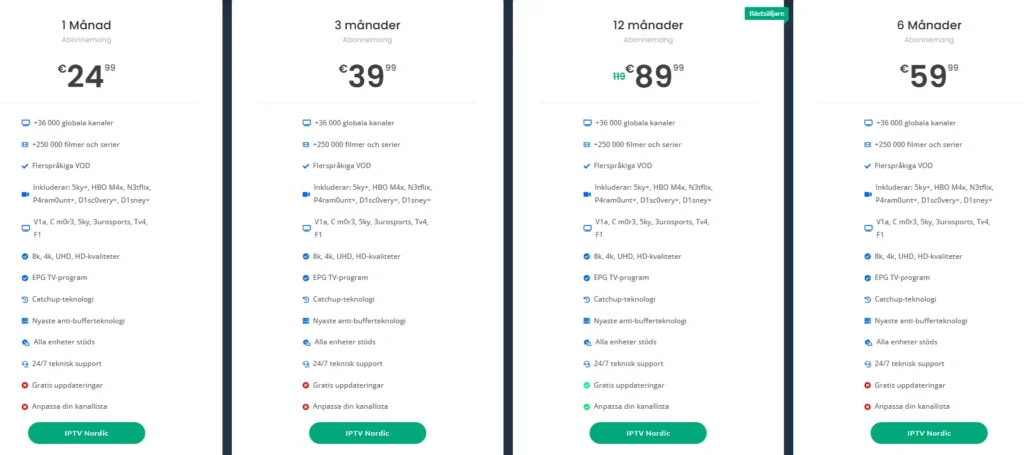
- Overview of Subscription Plans: Smart IPTV Nordic offers various plans tailored to different needs:
- 1 Month: €24.99
- 3 Months: €39.99
- 6 Months: €59.99
- 12 Months: €89.99
- Recommendations: For users in Sweden, it’s advisable to choose a plan that provides access to a wide range of channels, including local and international options. Check out the IPTV plans available to find the best fit for your viewing habits.
Common Problems and How to Troubleshoot Them
When activating your IPTV box, you may encounter various issues that can hinder your viewing experience. Understanding these common problems and knowing how to troubleshoot them is essential for a smooth activation process. In this section, we will explore typical activation errors, network connectivity issues, and how to update or reset your IPTV box.
Activation Errors and Their Fixes
One of the most frustrating experiences when setting up your IPTV box is encountering activation errors. Here are some common error messages and their solutions:
- Activation Failed: This error often occurs if the IPTV activation code is incorrect or has expired. Double-check the code you entered and ensure it matches the one provided by your IPTV service provider. If the code is correct, try restarting your IPTV box and re-entering the code.
- Code Already Used: If you receive a message stating that the code has already been used, it may indicate that the code is linked to another device. Contact your IPTV provider for assistance in resetting the code or obtaining a new one.
- Network Error: This error suggests that your IPTV box is not connected to the internet. Ensure that your internet connection is stable and that the box is properly connected to your router. You can check your network settings in the IPTV box menu.
Network and Connectivity Issues
Network issues can significantly affect your IPTV experience. Here are some steps to troubleshoot connectivity problems:
- Checking Your Internet Connection:
- Use a speed test tool to verify your internet speed. A minimum of 10 Mbps is recommended for HD streaming, while 25 Mbps is ideal for 4K content.
- If your speed is lower than expected, consider restarting your router or contacting your internet service provider.
- Router Compatibility and Settings:
- Ensure that your router is compatible with your IPTV box. Some older routers may not support the required streaming protocols.
- Check your router settings to ensure that there are no restrictions on the IPTV box. You may need to enable UPnP (Universal Plug and Play) for optimal performance.
- Using a Wired Connection: If you are experiencing frequent buffering or disconnections, consider switching to a wired connection using an Ethernet cable. This can provide a more stable and faster connection compared to Wi-Fi.
Updating and Resetting Your IPTV Box
Keeping your IPTV box updated is crucial for optimal performance. Here’s how to perform updates and reset your device if needed:
- How to Perform Updates:
- Navigate to the settings menu on your IPTV box.
- Look for the “Software Update” or “System Update” option.
- Follow the prompts to check for and install any available updates. Regular updates can fix bugs and improve functionality.
- Steps to Reset Your Device: If you continue to experience issues, resetting your IPTV box may help. Here’s how to do it:
- Locate the reset button on your IPTV box (usually found on the back or bottom).
- Press and hold the reset button for about 10 seconds until the device powers off and restarts.
- After the reset, you will need to re-enter your IPTV activation code and set up your preferences again.
Using VPNs and Geo-Restriction Considerations
In some cases, users may consider using a VPN (Virtual Private Network) to enhance their IPTV experience. Here’s when and why you might want to use a VPN:
- When to Use a VPN: If you are traveling outside Sweden and want to access your local IPTV channels, a VPN can help you bypass geo-restrictions. It allows you to connect to a server in Sweden, making it appear as though you are accessing the internet from within the country.
- Understanding Geo-Restrictions: Many IPTV services impose geo-restrictions based on licensing agreements. This means that certain content may not be available outside specific regions. A VPN can help you navigate these restrictions, but it’s important to choose a reputable VPN service that does not compromise your streaming quality.
- Legal Implications: While using a VPN is legal in Sweden, it is essential to ensure that you are still accessing licensed content. Using a VPN to access pirated content can lead to legal consequences.
FAQs About IPTV Box Activation in Sweden
When it comes to activating your IPTV box in Sweden, many users have questions regarding the process, troubleshooting, and best practices. In this section, we will address some of the most frequently asked questions to help you navigate the activation process smoothly.
Answers to Common User Questions
- How do I activate my IPTV box in Sweden?
Activating your IPTV box involves several steps:
- Connect your IPTV box to your TV and internet.
- Download the IPTV app from the app store on your device.
- Enter your IPTV activation code provided by your service provider.
- Choose a subscription plan that suits your needs. For detailed instructions, refer to our IPTV setup guide.
- What IPTV services reliable in Sweden?
It is crucial to use licensed IPTV services to avoid legal issues. Some reputable providers include:
- Smart IPTV Nordic: Offers over 36,000 channels and 250,000 VOD movies.
- Viasat: Known for comprehensive sports coverage.
- Com Hem: Provides high-speed internet bundles with IPTV options.
- Telenor IPTV: Features an extensive channel lineup. For more information, check out the IPTV services in Sweden.
- Why does my IPTV box say activation failed?
An activation failure can occur due to several reasons:
- Incorrect IPTV activation code: Double-check the code you entered.
- Network issues: Ensure your IPTV box is connected to the internet.
- Code already used: If the code has been activated on another device, contact your provider for assistance.
- Can I use any IPTV box with Swedish internet providers?
Most IPTV boxes are compatible with Swedish internet providers, but it’s essential to check the specifications of your IPTV box. Ensure it supports the necessary streaming protocols and is compatible with your router settings. - How do I update or reset my IPTV box?
To update your IPTV box:
- Navigate to the settings menu and select “Software Update.”
- Follow the prompts to install any available updates. To reset your IPTV box:
- Locate the reset button on the device.
- Press and hold it for about 10 seconds until the device restarts. You will need to re-enter your activation code after resetting.
- Is it necessary to use a VPN to watch IPTV in Sweden?
While using a VPN is not mandatory, it can be beneficial if you want to access content that is geo-restricted. A VPN allows you to connect to a server in Sweden, making it appear as though you are accessing the internet from within the country. However, ensure that you are still using licensed IPTV services to avoid legal issues. - Where do I find the activation code for my IPTV box?
Your IPTV activation code is typically provided by your IPTV service provider upon subscription. Check your email or account dashboard for this information. If you cannot find it, contact your provider for assistance.
Additional Resources and Support
For further assistance with your IPTV box activation, Smart IPTV Nordic offers a variety of resources to help you. Here are some useful links:
- Installation Guide: Step-by-step instructions for setting up your IPTV box.
- Channel List: Explore the channels available with your subscription.
- Support: Access customer support for any issues you may encounter.
- Contact Support via WhatsApp: For immediate help, reach out to us at WhatsApp.
How to Activate Your IPTV Box: Conclusion
In conclusion, activating your IPTV box in Sweden is a straightforward process that opens the door to a world of entertainment. By following the steps outlined in this guide, you can easily connect your device, download the necessary app, and enter your IPTV activation code to start enjoying over 36,000 international channels and 250,000 VOD movies and series.
Key Benefits of Using an IPTV Box:
- 24/7 Support: Our dedicated team is always available to assist you with any questions or issues you may encounter.
- Comprehensive Setup Guides: We provide detailed instructions to ensure a smooth activation process.
- Up-to-Date IPTV Content: Enjoy the latest shows and movies in stunning quality, including 4K and UHD options.
Remember, using a licensed IPTV service is crucial for a legal and hassle-free viewing experience. If you have any questions or need further assistance, don’t hesitate to reach out!
👉 Ready to get started? Visit our pricing page to choose the perfect subscription plan for you, or feel free to contact us via WhatsApp for immediate support. We’re here to help you every step of the way! Happy streaming!
