 Skip to content

What is M3U IPTV?
Understanding M3U Files
M3U IPTV refers to a specific format used for creating playlists that allow users to stream content over the internet. An M3U file is essentially a text file that contains a list of media files or streams, each identified by a URL. This format is widely used in the IPTV (Internet Protocol Television) industry because it simplifies the process of accessing various channels and content from a single source.

The structure of an M3U file is straightforward. Each entry typically includes the URL of the media stream, along with optional metadata such as the title and duration. For example, a basic M3U file might look like this:
#EXTM3U
#EXTINF:-1,Channel Name
http://example.com/stream1
#EXTINF:-1,Another Channel
http://example.com/stream2
This format allows IPTV services to deliver a wide range of channels and content efficiently. By using an IPTV M3U playlist, users can easily switch between channels without needing to navigate through multiple applications or interfaces.
How IPTV Uses M3U
IPTV services leverage M3U playlists to provide users with a seamless streaming experience. When a user subscribes to an IPTV service, they often receive an IPTV M3U file that contains links to various channels and on-demand content. This file can be loaded into compatible IPTV players, enabling users to access their favorite shows and movies instantly.
The benefits of using M3U for streaming content are numerous:
- Convenience: Users can access multiple channels from a single playlist.
- Flexibility: M3U files can be updated easily, allowing providers to add or remove channels without requiring users to make significant changes.
- Compatibility: Most modern IPTV players support M3U playlists, making it easy for users to find a suitable application for their devices.
For those looking to explore the world of IPTV, understanding how M3U IPTV works is crucial. It not only enhances the viewing experience but also opens up a vast array of content options. If you’re interested in trying out M3U IPTV, consider checking out Smart IPTV Nordic for a comprehensive selection of channels and services.
Frequently Asked Questions
- What is M3U IPTV and how does it work?
- M3U IPTV uses M3U files to create playlists for streaming content over the internet. These files contain URLs that point to various media streams.
- How to use M3U IPTV playlists on different devices?
- M3U playlists can be used on various devices, including smart TVs, smartphones, and tablets, by loading them into compatible IPTV applications.
- What are the best IPTV players supporting M3U playlists?
- Popular IPTV players include Smart IPTV, VLC Media Player, and Kodi, all of which support M3U playlists.
- Are free M3U IPTV playlists reliable?
- While some free M3U playlists exist, they may not always be reliable or legal. It’s advisable to use paid services for a more stable experience.
- How to update M3U IPTV playlists?
- Updating M3U playlists typically involves replacing the old file with a new one provided by your IPTV service.
For more information on how to set up and use M3U IPTV, visit our installation guide. If you’re ready to dive into the world of IPTV, check out our subscription plans to find the perfect option for you!
How to Use M3U IPTV Playlists
Compatible Devices and Apps
Using M3U IPTV playlists is a straightforward process, but it requires compatible devices and applications to ensure a seamless streaming experience. Here’s a list of devices that support M3U IPTV:
- Smart TVs: Many modern smart TVs come with built-in IPTV applications that can load M3U playlists directly.
- Streaming Devices: Devices like Amazon Fire Stick, Roku, and Android TV boxes are excellent for IPTV streaming.
- Smartphones and Tablets: Both Android and iOS devices can run various IPTV apps that support M3U files.
- Computers: Windows, macOS, and Linux users can utilize media players like VLC or Kodi to access M3U playlists.
When it comes to applications, here are some recommended options for playing IPTV M3U playlists:
- Smart IPTV: A user-friendly app that allows you to upload M3U files easily.
- VLC Media Player: A versatile media player that supports M3U playlists and is available on multiple platforms.
- Kodi: An open-source media center that can be customized with various add-ons to enhance IPTV functionality.
- Perfect Player: A popular IPTV player that supports M3U playlists and offers a sleek interface.
By choosing the right device and app, you can enjoy a wide range of channels and content through your M3U IPTV playlist.
Step-by-Step Setup Guide
Setting up M3U IPTV playlists on your device is a simple process. Follow these steps to get started:
- Obtain Your M3U File: After subscribing to an IPTV service, you will receive an IPTV M3U file. This file contains the necessary links to access your channels.
- Choose Your Device: Decide which device you will use for streaming. Ensure it supports M3U playlists.
- Install the IPTV App: Download and install a compatible IPTV application on your device. For example, if you’re using a smart TV, you might find Smart IPTV in the app store.
- Load the M3U File:
- For Smart IPTV: Open the app, navigate to the settings, and enter the URL of your M3U file or upload it directly if you have it saved on your device.
- For VLC: Open VLC, go to “Media” > “Open Network Stream,” and paste the URL of your M3U file.
- For Kodi: Install the PVR IPTV Simple Client add-on, then configure it to point to your M3U file.
- Start Streaming: Once the M3U file is loaded, you can start browsing through the channels and enjoy your content.
Troubleshooting Common Setup Issues
If you encounter issues while setting up your M3U IPTV playlist, consider the following tips:
- Check Your Internet Connection: A stable internet connection is crucial for streaming. Ensure your device is connected to the internet.
- Verify the M3U URL: If you’re using a URL to access your M3U file, double-check that it is correct and active.
- Update Your App: Ensure that your IPTV application is up to date, as updates often fix bugs and improve performance.
- Restart Your Device: Sometimes, a simple restart can resolve connectivity issues.
For more detailed instructions on installation and troubleshooting, visit our installation guide. If you’re ready to explore the vast world of IPTV, check out our subscription plans to find the perfect option for you!
By following these steps, you can easily set up and enjoy your M3U IPTV playlists on various devices, unlocking a world of entertainment at your fingertips.
How to Use M3U IPTV Playlists
Compatible Devices and Apps
Using M3U IPTV playlists is a straightforward process, but it requires compatible devices and applications to ensure a seamless streaming experience. Here’s a list of devices that support M3U IPTV:
- Smart TVs: Many modern smart TVs come with built-in IPTV applications that can load M3U playlists directly.
- Streaming Devices: Devices like Amazon Fire Stick, Roku, and Android TV boxes are excellent for IPTV streaming.
- Smartphones and Tablets: Both Android and iOS devices can run various IPTV apps that support M3U files.
- Computers: Windows, macOS, and Linux users can utilize media players like VLC or Kodi to access M3U playlists.
When it comes to applications, here are some recommended options for playing IPTV M3U playlists:
- Smart IPTV: A user-friendly app that allows you to upload M3U files easily.
- VLC Media Player: A versatile media player that supports M3U playlists and is available on multiple platforms.
- Kodi: An open-source media center that can be customized with various add-ons to enhance IPTV functionality.
- Perfect Player: A popular IPTV player that supports M3U playlists and offers a sleek interface.
By choosing the right device and app, you can enjoy a wide range of channels and content through your M3U IPTV playlist.
Step-by-Step Setup Guide
Setting up M3U IPTV playlists on your device is a simple process. Follow these steps to get started:
- Obtain Your M3U File: After subscribing to an IPTV service, you will receive an IPTV M3U file. This file contains the necessary links to access your channels.
- Choose Your Device: Decide which device you will use for streaming. Ensure it supports M3U playlists.
- Install the IPTV App: Download and install a compatible IPTV application on your device. For example, if you’re using a smart TV, you might find Smart IPTV in the app store.
- Load the M3U File:
- For Smart IPTV: Open the app, navigate to the settings, and enter the URL of your M3U file or upload it directly if you have it saved on your device.
- For VLC: Open VLC, go to “Media” > “Open Network Stream,” and paste the URL of your M3U file.
- For Kodi: Install the PVR IPTV Simple Client add-on, then configure it to point to your M3U file.
- Start Streaming: Once the M3U file is loaded, you can start browsing through the channels and enjoy your content.
Troubleshooting Common Setup Issues
If you encounter issues while setting up your M3U IPTV playlist, consider the following tips:
- Check Your Internet Connection: A stable internet connection is crucial for streaming. Ensure your device is connected to the internet.
- Verify the M3U URL: If you’re using a URL to access your M3U file, double-check that it is correct and active.
- Update Your App: Ensure that your IPTV application is up to date, as updates often fix bugs and improve performance.
- Restart Your Device: Sometimes, a simple restart can resolve connectivity issues.
For more detailed instructions on installation and troubleshooting, visit our installation guide. If you’re ready to explore the vast world of IPTV, check out our subscription plans to find the perfect option for you!
By following these steps, you can easily set up and enjoy your M3U IPTV playlists on various devices, unlocking a world of entertainment at your fingertips.
Best IPTV Players for M3U
Features to Look For
When it comes to enjoying M3U IPTV playlists, selecting the right IPTV player is crucial for a seamless viewing experience. Here are some key features to consider when choosing an IPTV player that supports M3U files:
- User-Friendly Interface: A clean and intuitive interface makes it easier to navigate through channels and content.
- Compatibility: Ensure the player is compatible with your device, whether it’s a smart TV, smartphone, or computer.
- Support for M3U Playlists: The player should easily allow you to load and manage M3U files.
- Streaming Quality: Look for players that support high-definition streaming, including 4K and UHD options.
- EPG (Electronic Program Guide): An integrated EPG helps you keep track of what’s on and when, enhancing your viewing experience.
- Customization Options: Some players allow you to customize the layout and settings to suit your preferences.
- Multi-Device Support: The ability to use the player across different devices can be a significant advantage.
By focusing on these features, you can ensure that your IPTV experience is enjoyable and hassle-free.
Popular IPTV Player Reviews
Here’s a look at some of the most popular IPTV players that support M3U playlists, along with their features and user experiences:
| IPTV Player | Key Features | User Experience |
|---|---|---|
| Smart IPTV | – Easy M3U file upload – EPG support – Multi-device compatibility | Users appreciate its simplicity and reliability, making it a top choice. |
| VLC Media Player | – Supports various formats – Free and open-source – Customizable settings | Known for its versatility, VLC is favored for its robust features and stability. |
| Kodi | – Highly customizable – Supports add-ons for enhanced functionality | Users love the flexibility and extensive community support for troubleshooting. |
| Perfect Player | – User-friendly interface – EPG support – Multi-screen support | Praised for its sleek design and ease of use, making it ideal for beginners. |
Each of these players has its strengths, and the best choice will depend on your specific needs and preferences. For a comprehensive IPTV experience, consider using a player that aligns with your viewing habits and device compatibility.
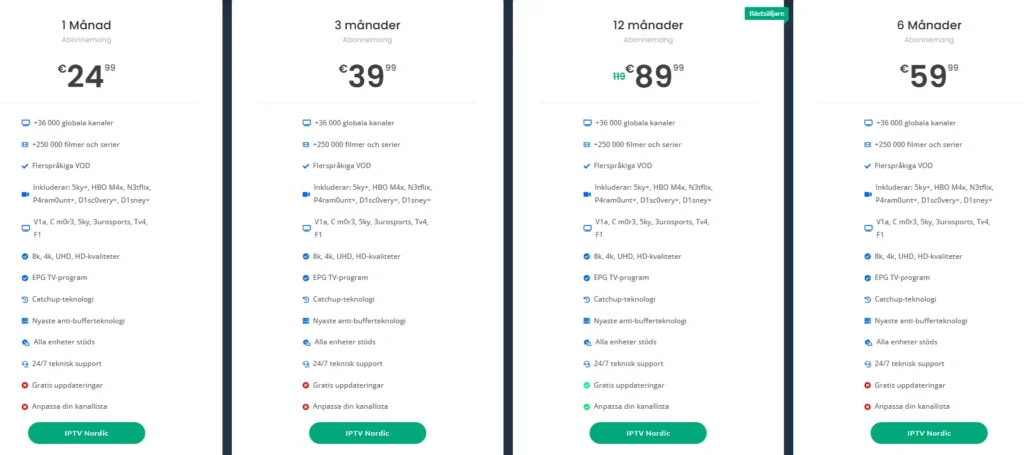
If you’re ready to dive into the world of IPTV, check out Smart IPTV Nordic for a reliable service that offers a wide range of channels and content through M3U playlists. With their subscription plans, you can enjoy high-quality streaming without the hassle of illegal sources.
Frequently Asked Questions about M3U IPTV
Addressing Common User Concerns and Misconceptions
As the popularity of M3U IPTV continues to rise, many users have questions about its functionality, and reliability. This section aims to address some of the most common concerns and misconceptions surrounding IPTV M3U playlists.
1. What is the difference between M3U and other formats?
M3U is a playlist format that is widely used in IPTV services. Unlike other formats, such as XML or JSON, M3U files are simple text files that contain a list of media streams, each identified by a URL. This simplicity allows for easy editing and sharing, making M3U a preferred choice for many IPTV providers. Other formats may offer more complex features but can be less user-friendly.
2. Are free M3U IPTV playlists reliable?
While there are many free IPTV M3U playlists available online, their reliability can be questionable. Free playlists often contain links to unauthorized streams, which may lead to legal issues or poor streaming quality. Additionally, these playlists can be frequently updated or removed, resulting in broken links. For a more stable and reliable experience, it is advisable to opt for paid services like Smart IPTV Nordic, which offer licensed content and consistent support.
3. How to update M3U IPTV playlists?
Updating your IPTV M3U playlist is typically straightforward. If you receive a new IPTV M3U file from your provider, simply replace the old file with the new one in your IPTV player. Many players also allow you to refresh the playlist directly within the app. Here’s a quick guide on how to do this:
- For Smart IPTV: Go to the settings and upload the new M3U file or URL.
- For VLC: Open the “Media” menu, select “Open Network Stream,” and paste the new URL.
- For Kodi: Navigate to the PVR IPTV Simple Client settings and update the M3U URL.
5. How to use M3U IPTV playlists on different devices?
Using M3U IPTV playlists is compatible with various devices, including smart TVs, smartphones, tablets, and computers. Here’s a brief overview of how to use M3U playlists on different platforms:
- Smart TVs: Install an IPTV app like Smart IPTV, then upload your M3U file.
- Smartphones/Tablets: Download an IPTV app from the app store, such as VLC or Kodi, and load your M3U playlist.
- Computers: Use VLC Media Player or Kodi to open and stream from your M3U file.
6. What are the best IPTV players supporting M3U playlists?
Several IPTV players are known for their compatibility with M3U playlists. Some of the best options include:
- Smart IPTV: User-friendly and supports M3U file uploads easily.
- VLC Media Player: Versatile and supports various formats, including M3U.
- Kodi: Highly customizable with add-ons for enhanced functionality.
- Perfect Player: Offers a sleek interface and supports M3U playlists.
Choosing the right player can significantly enhance your IPTV experience, so consider your needs and preferences when making a selection.
Embrace the Future of IPTV with M3U IPTV
In conclusion, M3U IPTV offers a convenient and flexible way to access a vast array of channels and content, making it an excellent choice for streaming enthusiasts. With features such as:
- 24/7 Support: Our dedicated team is always available to assist you with any questions or issues you may encounter.
- Comprehensive Setup Guides: We provide easy-to-follow instructions to help you get started with your M3U IPTV playlists on various devices.
- Up-to-Date IPTV Content: Enjoy access to a wide range of international and local channels, movies, and series, ensuring you never miss your favorite shows.
Choosing a reliable provider like Smart IPTV Nordic not only guarantees a legal and safe streaming experience but also enhances your viewing pleasure with high-quality content.
If you have any questions or need assistance, don’t hesitate to reach out via WhatsApp. We’re here to help you every step of the way! Explore our subscription plans today and unlock a world of entertainment at your fingertips. Embrace the future of television with confidence!
