 Skip to content

Understanding IPTV M3U Files: The Basics
What is an IPTV M3U File?
An IPTV M3U file is a text file that contains a list of multimedia content, specifically designed for Internet Protocol Television (IPTV) streaming. This file format is essential for users who want to access a variety of channels and on-demand content through their IPTV service. The M3U file format allows users to stream live television channels, movies, and series directly to their devices, such as smart TVs, computers, and mobile devices.

The structure of an M3U IPTV file is straightforward. It typically includes a series of URLs that point to the media streams. Each entry in the file can contain metadata, such as the channel name, logo, and other relevant information. For example, a basic entry in an M3U file might look like this:
“`
EXTM3U
EXTINF:-1, Channel Name
http://example.com/stream-url “`
This simple format makes it easy for users to create and share their own IPTV playlist files. By using an M3U file, users can customize their viewing experience, adding or removing channels as they see fit. This flexibility is one of the reasons why M3U files have become a popular choice among IPTV users.
The Importance of M3U IPTV File Format in Streaming
The M3U IPTV file format plays a crucial role in the world of streaming. Here are some key reasons why it is important:
- Compatibility: M3U files are widely supported across various IPTV applications and devices. This means that users can easily switch between different platforms without worrying about compatibility issues.
- Ease of Use: Creating and managing an IPTV playlist file is relatively simple. Users can edit the M3U file using any text editor, allowing for quick updates and modifications. This user-friendly approach makes it accessible for both tech-savvy individuals and those new to IPTV.
- Customization: With M3U files, users can curate their own playlists, selecting only the channels and content they want to watch. This level of customization enhances the viewing experience, making it more enjoyable and tailored to individual preferences.
- Cost-Effective: Many IPTV services offer M3U files as part of their subscription packages, allowing users to access a wide range of content without the need for expensive cable packages. This affordability is a significant draw for many users.
- Streaming Quality: M3U files can link to high-quality streams, ensuring that users enjoy a seamless viewing experience. The ability to choose from various sources can also help in finding the best quality streams available.
In summary, understanding the IPTV M3U file is essential for anyone looking to enhance their streaming experience. The M3U IPTV file format not only provides flexibility and customization but also ensures compatibility across devices. For more information on how to create and manage your own M3U files, check out this guide.
For those interested in exploring IPTV options, visit Smart IPTV Nordic to discover various plans and services that cater to your streaming needs. Whether you’re looking for live channels or a comprehensive VOD list, they have you covered. You can also reach out for assistance via WhatsApp if you have any questions about setting up your IPTV service.
How to Create and Use an IPTV Playlist File
Creating and using an IPTV playlist file is essential for anyone looking to enjoy a seamless streaming experience. The most common format for these playlists is the M3U IPTV file format, which allows users to access a variety of channels and content through their IPTV service. In this section, we will explore how to create your own IPTV playlist and share best practices for using these files effectively.
Step-by-Step Guide to Creating Your Own IPTV Playlist
Creating an IPTV playlist file can seem daunting, but it’s a straightforward process. Follow these steps to create your own M3U IPTV file:
- Choose a Text Editor: Start by selecting a simple text editor like Notepad (Windows) or TextEdit (Mac). These programs allow you to create and edit plain text files easily.
- Understand the M3U Format: The M3U IPTV file format consists of a list of URLs pointing to the streaming content. Each entry typically includes a header line that starts with
#EXTINF:followed by the channel name and the URL of the stream. Here’s a basic structure:
#EXTM3U
   #EXTINF:-1, Channel Name
http://example.com/stream-url - Gather Streaming URLs: Collect the streaming URLs for the channels you want to include. Ensure these links are valid and accessible. You can find many IPTV sources online, but always verify their legality.
- Create Your Playlist: In your text editor, start with the
#EXTM3Uline, followed by each channel’s details. For example:
#EXTM3U
   #EXTINF:-1, Example Channel
   http://example.com/example-stream
   #EXTINF:-1, Another Channel
http://example.com/another-stream - Save the File: Once you’ve added all your channels, save the file with a
.m3uextension, such asmyiptvplaylist.m3u. Make sure to select “All Files” in the save dialog to avoid saving it as a text file. - Test Your Playlist: Open your IPTV player (like VLC or Kodi) and load your newly created playlist. Check that all channels are working correctly.
Best Practices for Using IPTV Playlist Files Effectively
To maximize your IPTV experience, consider these best practices when using your IPTV playlist file:
- Regular Updates: Streaming links can change frequently. Regularly update your playlist to ensure all channels are accessible. You can find updated lists on sites like Smart IPTV Nordic.
- Organize Your Channels: Group channels by category (e.g., sports, movies, news) to make navigation easier. This can be done by adding comments in your M3U file:
#EXTM3U
  # Sports Channels
  #EXTINF:-1, Sports Channel 1
http://example.com/sports1 - Backup Your Playlist: Always keep a backup of your playlist file. This way, if you accidentally delete it or if the links become outdated, you can easily restore it.
- Use Reliable Sources: When sourcing streaming URLs, ensure they come from reputable providers. This not only guarantees quality but also helps avoid legal issues.
- Explore VOD Options: If you’re interested in Video on Demand (VOD), consider integrating VOD links into your playlist. Check out Smart IPTV Nordic’s VOD list for options.
- Test on Multiple Devices: Ensure your playlist works across different devices and applications. This helps identify any compatibility issues early on.
By following these steps and best practices, you can create and manage an effective IPTV playlist file that enhances your viewing experience. For more information on IPTV services and playlists, visit Smart IPTV Nordic or check their M3U IPTV guide. If you have any questions or need assistance, feel free to reach out via WhatsApp.
Why Choose Smart IPTV Nordic for Your IPTV Needs
When it comes to selecting an IPTV service, Smart IPTV Nordic stands out as a premier choice for users seeking a reliable and comprehensive viewing experience. With a focus on quality, variety, and user satisfaction, Smart IPTV Nordic offers a range of features that cater to diverse entertainment needs. Here’s why you should consider this service for your IPTV needs.
Extensive Channel Selection and VOD Options
One of the most compelling reasons to choose Smart IPTV Nordic is its extensive channel selection and Video on Demand (VOD) options. Subscribers can access a wide array of channels, including sports, movies, news, and entertainment, all tailored to meet the preferences of various audiences. The service supports the m3u IPTV file format, which allows users to easily integrate their favorite channels into their viewing experience.
- Diverse Channel Lineup: Enjoy hundreds of channels from different genres, ensuring there’s something for everyone.
- VOD Library: Access a vast library of movies and series, available at your convenience. Check out the VOD list here.
- User-Friendly IPTV Playlist File: The service provides an easy-to-use IPTV playlist file, making it simple to navigate through channels and content.
With Smart IPTV Nordic, you can enjoy a seamless viewing experience that combines live television with on-demand content, all in one place. This flexibility is particularly beneficial for users who want to customize their entertainment options.
High-Quality Streaming and Device Compatibility
Another significant advantage of Smart IPTV Nordic is its commitment to high-quality streaming and broad device compatibility. The service ensures that users can enjoy their favorite content without interruptions or buffering, thanks to its robust infrastructure and advanced streaming technology.
- HD and 4K Streaming: Experience your favorite shows and movies in stunning high definition or even 4K, depending on your device capabilities.
- Multi-Device Support: Smart IPTV Nordic is compatible with a variety of devices, including smart TVs, smartphones, tablets, and streaming boxes. This means you can watch your favorite content wherever you are.
- Easy Installation: Setting up Smart IPTV is straightforward. For detailed installation instructions, visit this guide.
Moreover, the service is designed to work seamlessly with various IPTV applications, allowing users to utilize their m3u IPTV file for easy access to channels. This compatibility ensures that you can enjoy a hassle-free experience, whether you’re at home or on the go.
In conclusion, choosing Smart IPTV Nordic for your IPTV needs means opting for a service that prioritizes quality, variety, and user satisfaction. With an extensive channel selection, VOD options, high-quality streaming, and broad device compatibility, it’s a choice that caters to all your entertainment desires. For more information on plans and pricing, visit Smart IPTV Nordic Plans or contact support via WhatsApp.
Troubleshooting Common Issues with IPTV M3U Files
When using IPTV M3U files, users may encounter various issues that can disrupt their viewing experience. Understanding how to troubleshoot these common problems is essential for maintaining a seamless streaming service. Below, we will explore some of the most frequent errors associated with the M3U IPTV file format and provide solutions to resolve them effectively.
Common Errors and How to Fix Them
- Invalid M3U File Format: One of the most common issues is an invalid M3U file format. This can occur if the file is corrupted or improperly formatted. To fix this, ensure that the M3U file is correctly structured. You can open the file in a text editor to check for any syntax errors. A valid M3U file should start with
#EXTM3Uand include proper channel entries. - Buffering Issues: If you experience frequent buffering while streaming, it may be due to a slow internet connection or an overloaded server. To troubleshoot this:
- Check your internet speed using a speed test tool.
- Restart your router to refresh the connection.
- Try switching to a different server or channel within your IPTV playlist file.
- Channels Not Loading: Sometimes, specific channels may not load, which can be frustrating. This issue can arise from expired links or server downtime. To resolve this:
- Verify that the channels are still active by checking the provider’s website.
- Update your IPTV playlist file with the latest M3U links from your provider.
- Playback Errors: If you encounter playback errors, it could be due to compatibility issues with your device or the media player. Ensure that you are using a compatible media player that supports the M3U IPTV file format. Popular options include VLC Media Player and Kodi. If problems persist, consider reinstalling the media player or trying a different one.
- Authentication Failures: If your IPTV service requires authentication and you receive an error message, double-check your username and password. Ensure that you have entered the correct credentials as provided by your IPTV service. If you continue to face issues, contact your service provider for assistance.
When to Seek Support from Smart IPTV Nordic
If you have tried the above troubleshooting steps and are still experiencing issues with your IPTV M3U files, it may be time to seek professional support. Smart IPTV Nordic offers dedicated assistance for users facing challenges with their IPTV services. Here are some scenarios when you should consider reaching out:
- Persistent Errors: If you encounter ongoing errors that you cannot resolve, contacting support can provide you with expert guidance.
- Configuration Help: If you need assistance with setting up your IPTV playlist file or configuring your device, the support team can walk you through the process.
- Service Outages: In the event of a service outage or if you suspect that your M3U file links are down, Smart IPTV Nordic can provide updates and alternative solutions.
For immediate assistance, you can reach out to Smart IPTV Nordic through their contact page or visit their website for more resources. They also offer a variety of plans that cater to different viewing preferences, which you can explore here.
In conclusion, troubleshooting common issues with IPTV M3U files can often be resolved with simple steps. However, when in doubt, seeking support from professionals like Smart IPTV Nordic can ensure that you get back to enjoying your favorite channels without interruption. For more information on M3U files and IPTV services, check out their M3U IPTV guide and VOD list.
Maximizing Your IPTV Experience with Smart IPTV Nordic
When it comes to enhancing your IPTV experience, Smart IPTV Nordic stands out as a premier choice. By leveraging advanced features and technologies, users can enjoy seamless streaming and a wide array of content. One of the key components that elevate this experience is the use of the IPTV M3U file format, which allows for easy access to a variety of channels and on-demand content.
Utilizing Catchup Technology and EPG Features
One of the standout features of Smart IPTV Nordic is its Catchup Technology. This allows users to watch previously aired content at their convenience. With this feature, you can easily access shows and events that you may have missed, ensuring that you never miss out on your favorite programming.
Additionally, the Electronic Program Guide (EPG) enhances your viewing experience by providing a comprehensive schedule of upcoming shows. This feature allows you to plan your viewing ahead of time, making it easier to navigate through the extensive IPTV playlist file. Here are some benefits of utilizing Catchup Technology and EPG features:
- Convenience: Watch shows at your own pace.
- Comprehensive Listings: Access detailed information about upcoming programs.
- User-Friendly Interface: Easily navigate through channels and content.
To get started with Smart IPTV Nordic, you can find the necessary M3U IPTV file format on their website, which is essential for setting up your IPTV service. For more information on how to install and configure your IPTV service, visit this guide.
Customer Support and Satisfaction Guarantee: What to Expect
Customer support is a crucial aspect of any service, and Smart IPTV Nordic excels in this area. They offer a satisfaction guarantee, ensuring that users can enjoy their IPTV experience without any worries. If you encounter any issues, their dedicated support team is available to assist you promptly.
Here’s what you can expect from their customer support:
- 24/7 Availability: Get help whenever you need it.
- Multiple Contact Options: Reach out via WhatsApp or through their website.
- Expert Assistance: Receive guidance on troubleshooting and setup.
Moreover, Smart IPTV Nordic provides a variety of plans tailored to different viewing preferences. You can explore these options here. With a commitment to customer satisfaction, they ensure that your IPTV experience is not only enjoyable but also hassle-free.
In conclusion, maximizing your IPTV experience with Smart IPTV Nordic involves utilizing advanced features like Catchup Technology and EPG, along with reliable customer support. By integrating the IPTV M3U file format into your setup, you can unlock a world of entertainment that is both flexible and user-friendly. For more details on their offerings, check out their VOD list and IPTV list for Sweden.
Get Started with Smart IPTV Nordic Today
If you’re looking to enhance your viewing experience, Smart IPTV Nordic is your go-to solution. With a variety of subscription plans and special offers, getting started with Smart IPTV is both easy and rewarding. The service provides access to a wide range of channels and content, all delivered through the IPTV M3U file format, which is essential for seamless streaming.
Subscription Plans and Special Offers
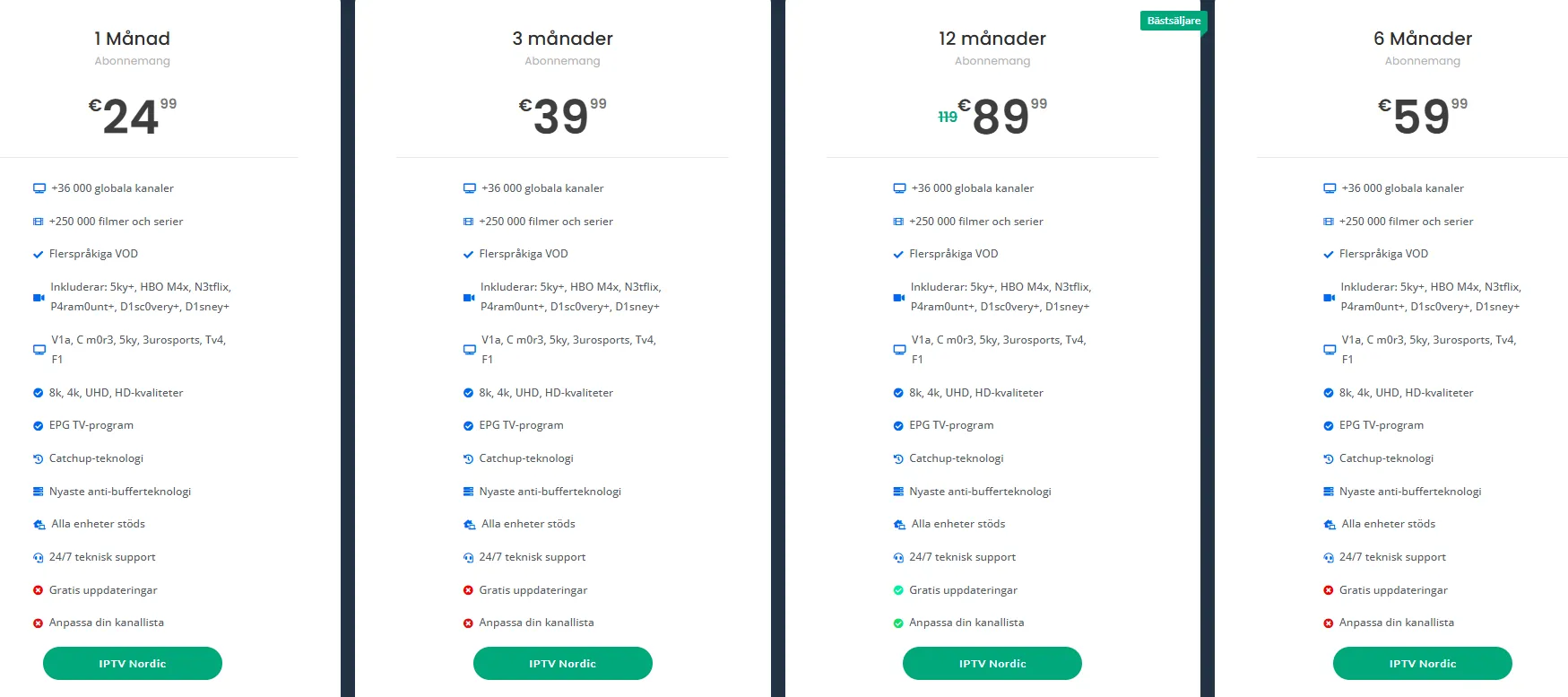
Smart IPTV Nordic offers several subscription plans tailored to meet different viewing needs. Here’s a quick overview of what you can expect:
- Basic Plan: Ideal for casual viewers, this plan includes access to popular channels and a selection of on-demand content.
- Premium Plan: For the avid viewer, this plan offers an extensive channel lineup, including sports, movies, and international content.
- Family Plan: Perfect for households, this plan allows multiple users to enjoy different content simultaneously.
Special Offers are frequently available, so be sure to check the plans page for the latest deals. Subscribing to Smart IPTV Nordic not only gives you access to a vast array of channels but also ensures you receive updates and new content regularly.
How to Order and Access Your IPTV Service
Getting started with Smart IPTV Nordic is straightforward. Follow these steps to order and access your IPTV service:
- Visit the Website: Go to Smart IPTV Nordic to explore the available plans.
- Choose Your Plan: Select the subscription plan that best fits your viewing habits.
- Create an Account: Fill out the registration form with your details to create an account.
- Payment: Complete your purchase using the secure payment options available.
- Receive Your M3U IPTV File: After payment, you will receive an IPTV playlist file in the M3U IPTV file format via email. This file is crucial for accessing your channels.
- Install the App: Download the Smart IPTV app on your device. You can find installation instructions on the installation page.
- Upload Your M3U File: Open the app and upload your M3U IPTV file to start streaming.
By following these steps, you can quickly set up your IPTV service and enjoy a world of entertainment. If you have any questions or need assistance, feel free to reach out via WhatsApp.
In conclusion, Smart IPTV Nordic provides an excellent opportunity to access a diverse range of channels through the M3U IPTV file format. With flexible subscription plans and easy setup, you can start enjoying your favorite shows and movies in no time. For more information on available content, check out the VOD list and the Swedish IPTV list.
