 Skip to content

Understanding IPTV Player M3U and Their Functionality
An IPTV player is a software application that allows users to stream television channels and video content over the internet using the Internet Protocol (IP). Unlike traditional cable or satellite services, IPTV delivers content through a broadband connection, providing a more flexible and customizable viewing experience. IPTV players are essential for accessing various types of content, including live TV, on-demand movies, and series, all through a single interface.

The M3U format is a widely used playlist format that enables IPTV players to access and organize streams. An M3U file contains a list of media files, including their locations and metadata, which the IPTV player uses to stream content. This format is particularly popular because it allows users to easily switch between channels and access a wide range of programming without the need for multiple applications.
What is the M3U Format and How Does It Work?
The M3U format is essentially a text file that lists the URLs of media streams. When you load an M3U playlist into an IPTV player, the player reads the file and retrieves the specified streams, allowing you to watch your favorite channels seamlessly. Here’s how it works:
- Playlist Structure: An M3U file typically starts with a header line that indicates the file type, followed by lines that contain the URLs of the media streams. Each entry can also include additional metadata, such as the channel name and logo.
- Loading Playlists: To use an M3U playlist, you simply need to open your IPTV player, navigate to the option for loading playlists, and select the M3U file. The player will then populate its interface with the channels listed in the playlist.
- Dynamic Updates: Many IPTV providers regularly update their M3U playlists to include new channels and remove inactive ones. This ensures that users have access to the latest content without needing to manually update their playlists.
In summary, understanding the functionality of IPTV players and the M3U format is crucial for anyone looking to enhance their streaming experience. By utilizing the best IPTV M3U player, you can access a wide variety of channels and enjoy high-quality content tailored to your preferences. For more information on setting up your IPTV experience, check out our installation guide.
If you’re interested in exploring premium IPTV services, consider visiting Smart IPTV Nordic for a comprehensive selection of IPTV options tailored to your needs.
Top IPTV Players Supporting M3U Playlists in Sweden
When it comes to enjoying IPTV M3U playlists, selecting the right player is crucial for a seamless streaming experience. This section will review the best IPTV M3U player options available in Sweden and compare free and paid IPTV players that support M3U files.
Review of the Best IPTV Players for M3U in 2026
- VLC Media Player
- Overview: VLC is a free, open-source media player that supports a wide range of audio and video formats, including M3U playlists.
- Key Features:
- Supports streaming from various sources.
- User-friendly interface with extensive customization options.
- Regular updates and a large community for support.
- How to Use: To load an M3U playlist, open VLC, go to “Media” > “Open Network Stream,” and paste the M3U URL.
- Kodi
- Overview: Kodi is a powerful media center that allows users to play and view most videos, music, podcasts, and other digital media files from local and network storage media and the Internet.
- Key Features:
- Highly customizable with various add-ons.
- Supports M3U playlists through PVR add-ons.
- Compatible with multiple platforms, including Windows, macOS, and Linux.
- How to Use: Install the PVR IPTV Simple Client add-on, configure it with your M3U URL, and enjoy streaming.
- Perfect Player
- Overview: Perfect Player is a user-friendly IPTV player that supports M3U playlists and offers a simple interface.
- Key Features:
- EPG (Electronic Program Guide) support for better navigation.
- Customizable layout and settings.
- Supports both M3U and XSPF playlists.
- How to Use: Enter your M3U URL in the settings to start streaming.
- MyIPTV Player
- Overview: MyIPTV Player is a Windows Store app that allows users to watch live TV channels from M3U playlists.
- Key Features:
- Simple and intuitive interface.
- EPG support for better navigation.
- Regular updates from the Microsoft Store.
- How to Use: Add your M3U playlist URL in the app settings to access channels.
- ProgDVB/ProgTV
- Overview: ProgDVB is a powerful software for watching digital TV and listening to radio channels from the Internet.
- Key Features:
- Supports M3U playlists and various streaming protocols.
- Offers advanced features like recording and timeshifting.
- How to Use: Load your M3U playlist through the “File” menu to start streaming.
Comparing Free and Paid IPTV Players for M3U Files
When choosing between free and paid IPTV players, consider the following factors:
- Cost: Free players like VLC and Kodi offer robust features without any cost, making them accessible to everyone. Paid players may offer additional features, such as enhanced customer support and premium content access.
- Features: Paid IPTV players often come with advanced features, such as better user interfaces, integrated EPGs, and additional customization options. Free players may lack some of these features but can still provide a solid streaming experience.
- User Experience: Paid players typically offer a more polished user experience, with fewer ads and a more intuitive interface. Free players may have a steeper learning curve but can be just as effective once set up.
- Support and Updates: Paid IPTV players often come with dedicated customer support and regular updates, ensuring that users have access to the latest features and fixes. Free players rely on community support, which can vary in responsiveness.
In conclusion, selecting the best IPTV M3U player is essential for enjoying a seamless streaming experience. By considering the options listed above and their features, you can enhance your IPTV experience significantly. For more information on setting up and managing your IPTV experience, check out our installation guide. If you have any questions or need assistance, feel free to reach out via WhatsApp. Enjoy your IPTV journey!
Step-by-Step Guide to Setting Up IPTV Players with M3U Files
Setting up an IPTV player M3U on your device is essential for accessing a wide range of channels and content. This section provides a detailed, step-by-step guide on how to load and play M3U playlists using popular IPTV players on various devices. By following these instructions, you can enjoy seamless streaming of your favorite shows and movies.
How to Load M3U Playlists into Popular IPTV Players
1. VLC Media Player
VLC Media Player is one of the most versatile and widely used media players for streaming M3U IPTV content. Here’s how to set it up:
- Download and Install VLC:
- Visit the official VLC website and download the latest version for Windows.
- Follow the installation prompts to install VLC on your computer.
- Open VLC Media Player:
- Launch VLC after installation.
- Load the M3U Playlist:
- Click on Media in the top menu.
- Select Open Network Stream from the dropdown menu.
- In the dialog box, paste the URL of your M3U playlist. If you have a local M3U file, click on File and browse to select the file.
- Click Play to start streaming.
- Enjoy Your Channels:
- Once the playlist is loaded, you can navigate through the channels using the VLC interface.
2. Kodi
Kodi is a powerful media center that allows users to play and view most videos, music, podcasts, and other digital media files. Here’s how to set it up for M3U playlists:
- Download and Install Kodi:
- Visit the official Kodi website and download the version suitable for your operating system.
- Install the PVR IPTV Simple Client Add-on:
- Open Kodi and go to Add-ons > My Add-ons > PVR Clients.
- Find PVR IPTV Simple Client and click on it.
- Click Install.
- Configure the Add-on:
- After installation, go to Configure.
- Under the General tab, select M3U Play List URL and paste your M3U link.
- Click OK and restart Kodi.
- Access Channels:
- Navigate to TV in the main menu to access your channels.
3. Perfect Player
Perfect Player is a user-friendly IPTV player that supports M3U playlists. Here’s how to set it up:
- Download and Install Perfect Player:
- Install Perfect Player from the official website or the Google Play Store.
- Add M3U Playlist:
- Open Perfect Player and go to Settings.
- Under General, find Playlist and enter your M3U URL.
- Save the settings and restart the app.
- Start Watching:
- Your channels will now be available for viewing.
4. MyIPTV Player
MyIPTV Player is a Windows Store app that allows users to watch live TV channels from M3U playlists. Here’s how to set it up:
- Download and Install MyIPTV Player:
- Download it from the Microsoft Store.
- Add M3U Playlist:
- Open the app and go to Settings.
- Under Playlist, enter your M3U URL.
- Save the settings.
- Enjoy Streaming:
- Access your channels directly from the app.
Installation Guide for IPTV Players on Different Devices
1. Smart TVs
- Download the IPTV App: Most smart TVs have dedicated IPTV apps available in their app stores. Look for apps like Smart IPTV or Perfect Player.
- Load the M3U Playlist: Open the app and follow the prompts to enter your M3U URL or upload the M3U file.
- Start Watching: Navigate through the channels and enjoy your content.
2. Android Devices
- Download an IPTV App: Install an IPTV app like IPTV Smarters or GSE Smart IPTV from the Google Play Store.
- Add M3U Playlist: Open the app, go to settings, and enter your M3U URL.
- Enjoy Streaming: Access your channels and start watching.
3. iOS Devices
- Download an IPTV App: Install an IPTV app like GSE Smart IPTV from the App Store.
- Load the M3U Playlist: Open the app, go to settings, and enter your M3U URL.
- Start Watching: Navigate through the channels and enjoy your content.
Tips for a Smooth Streaming Experience
- Stable Internet Connection: Ensure you have a stable and fast internet connection to avoid buffering issues while streaming.
- Regularly Update Your M3U Playlist: Many IPTV providers update their playlists frequently. Check for updates regularly to ensure you have access to the latest channels.
- Use a VPN: Consider using a VPN for added security and to access geo-restricted content. This can also help improve streaming speeds in some cases.
In conclusion, setting up an IPTV player M3U on your device is a straightforward process that can greatly enhance your viewing experience. By following the steps outlined above, you can easily access a wide range of channels and enjoy your favorite content. For more information on setting up and managing your IPTV experience, check out our installation guide. If you have any questions or need assistance, feel free to reach out via WhatsApp. Enjoy your IPTV journey!
Features to Consider When Choosing an IPTV Player for M3U
Selecting the right IPTV player M3U is crucial for ensuring a seamless streaming experience. With numerous options available, it’s important to know what features to look for in an IPTV player to maximize your enjoyment of M3U playlists. This section will outline the key features that enhance your IPTV experience and discuss user interface and usability considerations.
Key Features That Enhance Your IPTV Experience
- Compatibility with M3U Playlists:
- Ensure that the IPTV player you choose supports M3U playlists. This is essential for accessing the channels and content you want to watch. Most popular players, such as VLC, Kodi, and Perfect Player, are compatible with M3U files.
- Streaming Quality:
- Look for players that support high-definition (HD) and ultra-high-definition (4K) streaming. The ability to stream in higher resolutions significantly enhances the viewing experience, especially on larger screens. Players like VLC and Kodi are known for their excellent streaming quality.
- User-Friendly Interface:
- A clean and intuitive user interface makes it easier to navigate through channels and settings. Look for players that offer customizable layouts and easy access to your favorite channels. A well-designed interface can greatly improve your overall experience.
- Electronic Program Guide (EPG) Support:
- EPG support allows you to see what’s currently playing and what’s coming up next. This feature is particularly useful for live TV, as it helps you plan your viewing schedule. Many IPTV players, such as Perfect Player and Kodi, offer EPG integration.
- Regular Updates:
- Choose an IPTV player that receives regular updates. This ensures that the player remains compatible with the latest streaming protocols and features. Regular updates also help fix bugs and improve performance.
- Customization Options:
- The ability to customize settings, such as video quality, aspect ratio, and channel organization, can enhance your viewing experience. Look for players that allow you to tailor the interface and settings to your preferences.
- Multi-Device Support:
- If you plan to use your IPTV player on multiple devices, ensure that it is compatible with various platforms, including Windows, Android, iOS, and smart TVs. This flexibility allows you to enjoy your content on the device of your choice.
- Customer Support:
- Reliable customer support is essential for resolving any issues that may arise during setup or usage. Look for players that offer multiple support channels, such as email, chat, or phone support.
User Interface and Usability Considerations
When choosing an IPTV player, the user interface and overall usability are critical factors to consider:
- Ease of Navigation: A player with a straightforward navigation system allows users to quickly find and access their favorite channels. Look for players that categorize channels by genre or popularity for easier browsing.
- Search Functionality: A robust search feature can help you quickly locate specific channels or content within the player. This is especially useful for users with extensive playlists.
- Playback Controls: Ensure that the player has easy-to-use playback controls, including options for pausing, rewinding, and fast-forwarding. This enhances the viewing experience, especially for live TV.
- Customization of Channel Lists: The ability to create and manage custom channel lists can improve your experience. Look for players that allow you to favorite channels or create groups based on your viewing preferences.
- Visual Appeal: A visually appealing interface can enhance your overall enjoyment. Look for players that offer themes or skins to customize the look and feel of the application.
In conclusion, choosing the best IPTV M3U player involves considering various features that enhance your streaming experience. By focusing on compatibility, streaming quality, user interface, and support, you can select a player that meets your needs and preferences. For more information on high-quality IPTV services, consider visiting Smart IPTV Nordic for a comprehensive selection of IPTV offerings. If you have any questions or need assistance, feel free to reach out via WhatsApp. Enjoy your IPTV journey!
Common Problems and Troubleshooting Tips for IPTV Players
As you explore the world of IPTV M3U in Sweden, you may encounter some common issues that can affect your viewing experience. This section will provide you with troubleshooting tips and solutions to help you resolve these problems quickly and efficiently.
Common Problems and Their Solutions
- Channels Not Loading
- Issue: You may find that some or all channels in your IPTV M3U playlist are not loading.
- Solution:
- Check the M3U Link: Ensure that the M3U link is correctly entered in your IPTV application. A simple typo can prevent channels from loading.
- Test the Link: Open the M3U file in a text editor to verify that the URLs for the channels are correct and active.
- Update the Playlist: If the playlist is outdated, consider downloading a new version from a reliable source like Smart IPTV Nordic.
- Buffering Issues
- Issue: Frequent buffering can disrupt your viewing experience.
- Solution:
- Check Your Internet Connection: Ensure that you have a stable and fast internet connection. A minimum speed of 10 Mbps is recommended for HD streaming, while 25 Mbps is ideal for 4K content.
- Reduce Network Congestion: If multiple devices are connected to your network and using bandwidth, it can lead to buffering. Try disconnecting other devices or limiting their usage while streaming.
- Adjust Streaming Quality: If your connection is slow, consider lowering the streaming quality in your IPTV player settings.
- File Not Found Error
- Issue: You may receive an error stating that the M3U file cannot be found.
- Solution:
- Verify File Location: Ensure that the M3U file is saved in the correct location on your device and that the path is correctly entered in your IPTV player.
- Re-download the File: If the file is corrupted or missing, download it again from a trusted source.
- No EPG Data
- Issue: The Electronic Program Guide (EPG) may not display any data.
- Solution:
- Check EPG URL: Ensure that you have entered the correct EPG URL in your IPTV application settings. Some providers offer EPG links that need to be added separately.
- Provider Support: Contact your IPTV provider to confirm that they support EPG services and to obtain the correct URL.
- App Crashes or Freezes
- Issue: Your IPTV application may crash or freeze during use.
- Solution:
- Update the App: Ensure that your IPTV application is updated to the latest version. Developers often release updates to fix bugs and improve performance.
- Restart Your Device: Sometimes, simply restarting your Windows device can resolve temporary glitches that may be causing buffering issues.
- Clear Cache: If your app allows it, clear the cache to free up memory and improve performance.
Tips for Ensuring a Smooth IPTV Experience
To enhance your overall experience with IPTV M3U, consider the following tips:
- Regularly Update Your Playlists: Keep your M3U playlists updated to ensure access to the latest channels and content. Check for updates from your provider regularly.
- Use a VPN: If you experience geo-restrictions or throttling from your ISP, consider using a VPN to enhance your streaming experience. This can also help protect your privacy while using IPTV services.
- Choose Reliable Providers: Always opt for reputable IPTV providers that offer licensed content. This not only ensures a better viewing experience but also protects you from potential legal issues.
- Stay Informed: Join IPTV forums and communities to stay updated on the latest trends, tips, and troubleshooting advice. Engaging with other users can provide valuable insights and solutions.
Conclusion: Unlock the Best IPTV Player M3U Experience!
In conclusion, if you’re looking to enhance your streaming experience with the best IPTV player M3U, you’re making a smart choice for accessing a diverse range of channels and content. Here are some key benefits of using IPTV M3U playlists:
- Extensive Channel Selection: Access thousands of channels, including local and international options, all from a single source.
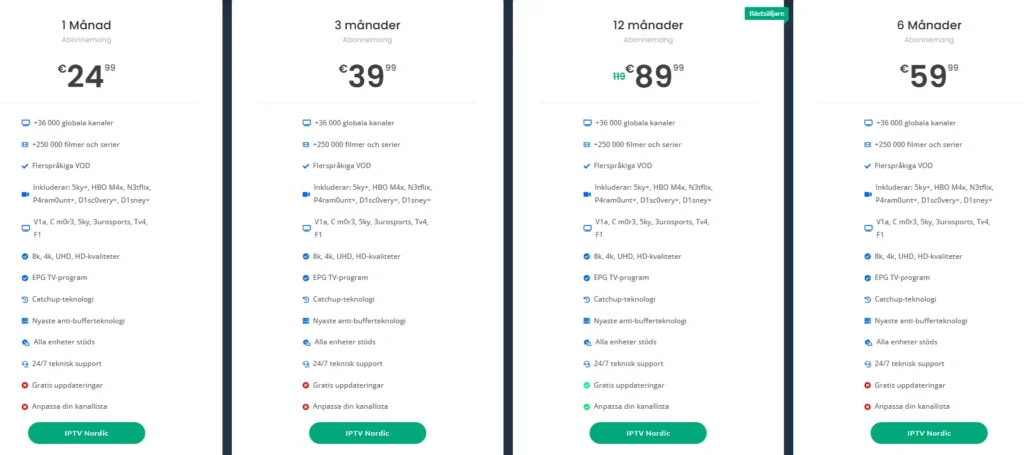
- Cost-Effective Solutions: With subscription plans starting as low as €24.99, IPTV M3U offers an economical alternative to traditional cable services.
- User-Friendly Setup: Setting up your IPTV M3U is straightforward, with easy-to-follow guides available to help you get started quickly.
- Regular Updates: Many providers, like Smart IPTV Nordic, offer updated playlists, ensuring you always have access to the latest channels and content.
- 24/7 Support: With round-the-clock customer support, you can rest assured that assistance is always available whenever you need it.
If you’re ready to explore the world of IPTV player M3U, consider visiting Smart IPTV Nordic to discover their comprehensive selection of IPTV subscriptions. With a 7-day money-back guarantee, you can try their service risk-free!
For any questions or assistance, don’t hesitate to reach out via WhatsApp. We’re here to help you every step of the way. Start your IPTV journey today and unlock a world of entertainment!
