 Skip to content

What are M3U IPTV Links?
M3U IPTV links are a type of playlist file that allows users to stream television channels and video content over the internet. The M3U format is a plain text file that contains a list of media files, including their locations and metadata. This format is widely used in the IPTV (Internet Protocol Television) community because it provides a simple way to access a variety of channels and on-demand content.

When you use M3U IPTV links, you can enjoy a seamless viewing experience, as these links can be integrated into various media players and IPTV applications. The beauty of M3U links lies in their flexibility; they can be used on multiple devices, including smart TVs, smartphones, tablets, and computers. This versatility makes them an attractive option for users looking to access a wide range of content without the need for traditional cable subscriptions.
How M3U Links Enhance Your IPTV Experience
Using M3U IPTV links can significantly enhance your viewing experience for several reasons:
- Diverse Content Access: M3U links can provide access to thousands of channels, including local and international options. This means you can watch your favorite shows, sports events, and movies from around the world.
- User-Friendly: Setting up M3U links is straightforward. Most IPTV applications allow you to simply paste the link into the app, making it easy for anyone to get started.
- Cost-Effective: Many M3U IPTV links are available for free or at a low cost, making them an economical alternative to traditional cable services. For instance, you can find free M3U IPTV links that offer a variety of channels without any subscription fees.
- Customization: Users can create their own playlists by combining different M3U links, allowing for a personalized viewing experience tailored to individual preferences.
- Regular Updates: Many IPTV providers offer updated M3U playlists, ensuring that you always have access to the latest channels and content. This is particularly important in a rapidly changing media landscape.
For those in Sweden looking to explore the world of IPTV, understanding how to effectively use M3U IPTV links is crucial. You can find reliable sources for these links and learn how to integrate them into your preferred devices. For more information on setting up and managing your IPTV experience, check out our installation guide.
In summary, M3U IPTV links are a powerful tool for accessing a wide array of television content. They offer flexibility, cost savings, and a user-friendly experience that can transform how you consume media. If you’re interested in exploring the best options available, consider visiting Smart IPTV Nordic for a comprehensive selection of IPTV services tailored to your needs.
How to Use M3U IPTV Links in Sweden
Using M3U IPTV links in Sweden can open up a world of entertainment, allowing you to access a vast array of channels and on-demand content. However, to fully enjoy the benefits of these links, it’s essential to understand how to set them up and which devices support them. This section will guide you through the platforms and devices compatible with M3U IPTV links, as well as provide a step-by-step guide to setting them up.
Supported Platforms and Devices for M3U IPTV
M3U IPTV links are versatile and can be used across various platforms and devices. Here’s a list of the most common devices that support M3U IPTV links:
- Smart TVs: Many modern smart TVs come with built-in IPTV applications that allow you to input M3U links directly.
- Streaming Devices: Devices like Roku, Amazon Fire Stick, and Apple TV can also support M3U links through specific apps.
- Mobile Devices: Both Android and iOS smartphones and tablets can use M3U links via dedicated IPTV applications available in their respective app stores.
- Computers: Windows, macOS, and Linux users can utilize media players like VLC or Kodi to stream content using M3U links.
- Set-Top Boxes: Many IPTV set-top boxes are designed to work seamlessly with M3U playlists.
By utilizing these devices, you can enjoy a wide range of channels and content, making your viewing experience more enjoyable and flexible.
Step-by-Step Guide to Setting Up M3U IPTV Links
Setting up M3U IPTV links is a straightforward process. Follow these steps to get started:
- Choose an IPTV Application: Select an IPTV application that supports M3U links. Popular options include VLC Media Player, Kodi, and various IPTV apps available on smart TVs and mobile devices.
- Obtain M3U IPTV Links: You can find reliable IPTV links M3U from various sources, including subscription services like Smart IPTV Nordic or free online repositories. Ensure that the links are up-to-date and from reputable sources.
- Open the IPTV Application: Launch the chosen IPTV application on your device.
- Locate the Playlist Option: In the application, look for an option to add or import a playlist. This is usually found in the settings or main menu.
- Input the M3U Link: Copy the M3U link you obtained and paste it into the designated field in the application. Make sure there are no extra spaces or characters.
- Save and Refresh: After entering the link, save your settings and refresh the playlist. The application should now load the channels available in the M3U link.
- Start Watching: Navigate through the channels and start enjoying your favorite shows and movies!
By following these steps, you can easily set up and enjoy M3U IPTV links on your preferred device. For more detailed instructions on installation, check out our installation guide.
Finding Reliable M3U IPTV Playlists for Sweden
When it comes to enjoying IPTV services, having access to M3U IPTV links is essential. However, not all links are created equal, and finding reliable playlists can be a challenge. In this section, we will explore the top sources for M3U IPTV links in Sweden and provide tips on how to evaluate the quality of these links to ensure a seamless viewing experience.
Top Sources for M3U IPTV Links
Finding trustworthy IPTV links M3U is crucial for accessing a wide range of channels and content. Here are some of the best sources to consider:
- Subscription Services:
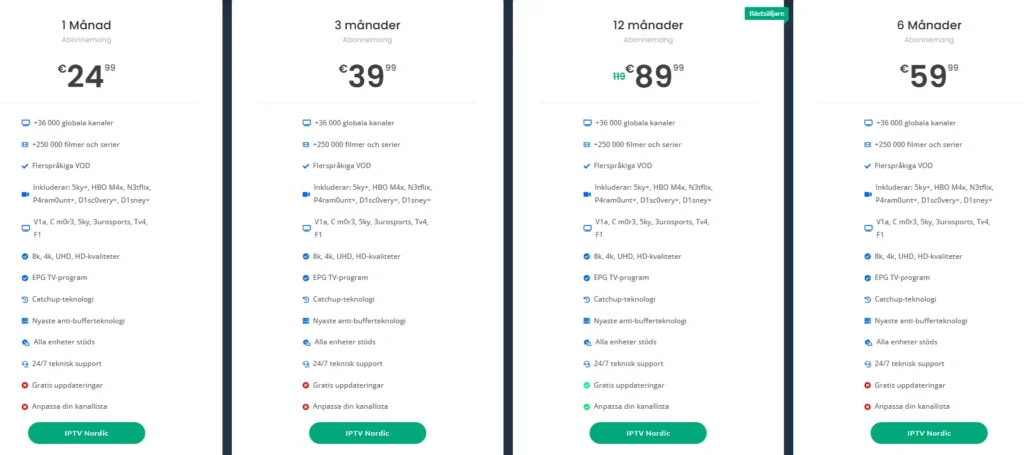
- Smart IPTV Nordic: This service offers a comprehensive selection of IPTV channels, including local and international options. With subscriptions starting at €24.99 for one month, you can access over 36,000 channels and a vast library of VOD content. For more details, visit Smart IPTV Nordic.
- Online Forums and Communities:
- Websites like Reddit and specialized IPTV forums often have threads where users share reliable M3U IPTV links. However, always verify the credibility of the sources and user feedback before using any links.
- Social Media Groups:
- Facebook and Telegram groups dedicated to IPTV can be valuable resources for finding updated playlists. Members often share their experiences and recommend reliable links.
- Free IPTV Websites:
- There are several websites that compile free M3U IPTV links. While these can be a good starting point, be cautious as the quality and legality of the links can vary significantly.
- YouTube Channels:
- Some YouTube creators specialize in IPTV content and may provide links to playlists in their video descriptions. Look for channels with positive reviews and a good subscriber base.
Evaluating the Quality of IPTV Links
Once you have found potential M3U IPTV links, it’s important to evaluate their quality to ensure a satisfactory viewing experience. Here are some key factors to consider:
- Channel Variety: A good M3U playlist should offer a diverse range of channels, including local, international, and niche options. Check if the playlist includes your favorite channels.
- Update Frequency: Reliable IPTV providers regularly update their playlists to ensure that users have access to the latest channels and content. Look for sources that mention regular updates.
- User Reviews: Before using any M3U link, search for user reviews or feedback. This can provide insights into the reliability and performance of the playlist.
- Streaming Quality: Test the links to see if they provide high-quality streaming. A good M3U link should support HD or even 4K streaming without buffering issues.
- Legal Considerations: Ensure that the sources you are using comply with local laws regarding IPTV services. Using illegal links can lead to legal repercussions.
- Support and Documentation: Reliable IPTV services often provide customer support and documentation to help users set up and troubleshoot their playlists. Check if the provider offers assistance if needed.
By following these guidelines, you can find and evaluate M3U IPTV links that enhance your viewing experience in Sweden. For a hassle-free option, consider subscribing to Smart IPTV Nordic, where you can access a wide range of channels and enjoy high-quality streaming.
In conclusion, finding reliable M3U IPTV playlists is essential for a satisfying IPTV experience. By exploring various sources and evaluating the quality of the links, you can ensure that you have access to the best content available. If you have any questions or need assistance, feel free to reach out via WhatsApp for support. Enjoy your IPTV journey!
Managing and Updating Your M3U Playlists
Managing and updating your M3U IPTV links is essential for ensuring a smooth and enjoyable viewing experience. As channels change and new content becomes available, keeping your playlists current can help you avoid interruptions and access the latest offerings. In this section, we will provide a step-by-step guide on how to update your M3U IPTV playlists and share tips for organizing your IPTV channels effectively.
How to Update M3U IPTV Playlists
Updating your M3U IPTV playlists is a straightforward process, but it requires attention to detail to ensure that you are using the most current links. Here’s how to do it:
- Check for Updates Regularly: Many IPTV providers, including Smart IPTV Nordic, offer updated M3U links regularly. Make it a habit to check for updates at least once a month to ensure you have the latest channels.
- Obtain New M3U Links: If you find that your current playlist is outdated or not functioning properly, look for new M3U links. You can find these from:
- Your IPTV Provider: Check the official website or contact customer support for the latest links.
- Online Forums: Communities dedicated to IPTV often share updated playlists.
- Social Media Groups: Join groups on platforms like Facebook or Telegram where users share updated M3U links.
- Replace Old Links: Once you have obtained new M3U links, you will need to replace the old ones in your IPTV application. Here’s how:
- Open your IPTV application (e.g., VLC, Kodi).
- Navigate to the settings or playlist section.
- Remove the old M3U link and paste the new one in the designated field.
- Save your changes and refresh the playlist.
- Test the New Links: After updating, it’s crucial to test the new M3U links to ensure they are working correctly. Check a few channels to confirm that they are streaming without issues.
- Backup Your Playlists: To avoid losing your settings in the future, consider backing up your M3U playlists. Most IPTV applications allow you to export your playlist, which you can save on your device or cloud storage.
By following these steps, you can keep your M3U IPTV playlists updated and enjoy uninterrupted access to your favorite channels.
Tips for Organizing Your IPTV Channels
A well-organized IPTV channel list can enhance your viewing experience by making it easier to find your favorite content. Here are some tips for organizing your M3U IPTV links effectively:
- Categorize Channels: Group channels by categories such as Sports, Movies, News, and Entertainment. This makes it easier to navigate through your playlist and find what you want to watch quickly.
- Use Favorites: Most IPTV applications allow you to mark channels as favorites. Use this feature to create a list of your most-watched channels for quick access.
- Rename Channels: If your IPTV application allows it, consider renaming channels for easier identification. For example, you can rename a channel to include the genre or the type of content it offers.
- Regularly Review Your Playlist: Periodically review your M3U playlist to remove channels you no longer watch. This helps keep your list manageable and focused on the content you enjoy.
- Utilize Multiple Playlists: If you have access to different M3U links, consider using multiple playlists for different types of content. For instance, you could have one playlist for live TV and another for on-demand content.
- Stay Informed About New Channels: Keep an eye on announcements from your IPTV provider regarding new channels or content. Adding these to your playlist can enhance your viewing options.
By implementing these organizational strategies, you can streamline your IPTV experience and make it more enjoyable. For more information on managing your IPTV service, check out our installation guide.
Frequently Asked Questions About M3U IPTV Links
As the use of M3U IPTV links continues to grow, many users in Sweden have questions about how to effectively utilize these links for their streaming needs. This section addresses some of the most common inquiries regarding M3U IPTV links, providing clear and concise answers to help you navigate the world of IPTV more effectively.
Common Questions from Swedish Users
- What are M3U IPTV links?
- M3U IPTV links are playlist files that allow users to stream television channels and video content over the internet. These links are formatted in plain text and contain a list of media files, including their locations and metadata. They are widely used in the IPTV community for their flexibility and ease of use.
- How to use M3U IPTV links in Sweden?
- To use M3U IPTV links in Sweden, you need to select a compatible IPTV application, obtain the M3U link, and input it into the application. Popular devices include smart TVs, streaming devices, and media players like VLC or Kodi. For a detailed guide, refer to our installation guide.
- Are M3U IPTV links legal in Sweden?
- The legality of M3U IPTV links in Sweden depends on the content being streamed. If the links are from legitimate providers that have the necessary licenses, they are legal. However, using links that provide pirated content can lead to legal issues. Always verify the source of your M3U links.
- Where to find reliable M3U IPTV links for Sweden?
- Reliable IPTV links M3U can be found through subscription services like Smart IPTV Nordic, online forums, social media groups, and reputable websites. It’s essential to ensure that the sources are trustworthy to avoid issues with quality and legality.
- How to update M3U IPTV playlists?
- Updating your M3U IPTV playlists involves checking for new links regularly, replacing old links in your IPTV application, and testing the new links to ensure they work. For a step-by-step guide, refer to the previous section on managing and updating your playlists.
- What devices support M3U IPTV links?
- M3U IPTV links are supported on various devices, including:
- Smart TVs: Many come with built-in IPTV applications.
- Streaming Devices: Such as Roku, Amazon Fire Stick, and Apple TV.
- Mobile Devices: Both Android and iOS smartphones and tablets.
- Computers: Windows, macOS, and Linux users can use media players like VLC or Kodi.
- Set-Top Boxes: Many are designed to work with M3U playlists.
Expert Answers to Your IPTV Queries
- How can I ensure the quality of my M3U IPTV links?
- To ensure quality, look for links that are frequently updated, have positive user reviews, and come from reputable sources. Testing the links for streaming quality is also essential.
- What should I do if my M3U link stops working?
- If your M3U link stops working, first check for updates from your IPTV provider. If the link is outdated, look for new links from reliable sources. You can also reach out to customer support for assistance.
- Can I use M3U IPTV links on multiple devices?
- Yes, one of the advantages of M3U IPTV links is their versatility. You can use the same link across multiple devices, provided they support IPTV applications.
- Is there a way to create my own M3U playlist?
- Yes, you can create your own M3U playlist by compiling various M3U links into a single file. This allows you to customize your viewing experience by including only the channels you prefer.
- What are the benefits of using Smart IPTV Nordic?
- Subscribing to Smart IPTV Nordic offers numerous benefits, including access to over 36,000 channels, a vast library of VOD content, high-quality streaming, and 24/7 customer support. Their service is designed to provide a seamless IPTV experience tailored to your needs.
In conclusion, understanding the common questions and concerns surrounding M3U IPTV links can significantly enhance your IPTV experience. For more information or assistance, feel free to reach out via WhatsApp. Enjoy exploring the world of IPTV with confidence!
Conclusion: Unlock the Power of M3U IPTV Links Today!
In summary, M3U IPTV links offer an incredible opportunity for viewers in Sweden to access a vast array of channels and on-demand content. With the flexibility to use these links across various devices, you can enjoy your favorite shows and movies anytime, anywhere. Here are some key benefits of using M3U IPTV links:
- Diverse Content Access: Enjoy thousands of channels, including local and international options.
- User-Friendly Setup: Easily integrate M3U links into your preferred IPTV applications.
- Cost-Effective Solutions: Many links are available for free or at a low cost, making IPTV an economical alternative to traditional cable.
- Regular Updates: Stay current with the latest channels and content through updated playlists.
- 24/7 Support: With services like Smart IPTV Nordic, you can rely on round-the-clock assistance to enhance your viewing experience.
If you’re ready to elevate your IPTV experience, consider subscribing to Smart IPTV Nordic. With access to over 36,000 channels and a commitment to quality, you can enjoy seamless streaming tailored to your preferences. Plus, with our 7-day money-back guarantee, you can try our service risk-free!
For any questions or assistance, don’t hesitate to reach out via WhatsApp. We’re here to help you every step of the way. Start your IPTV journey today and unlock a world of entertainment!
